Clip versus delete
A clip box or plane limits what is shown or selected for the current task. Keep the original source file intact unless you intentionally export a derived subset.

Point-cloud cropping
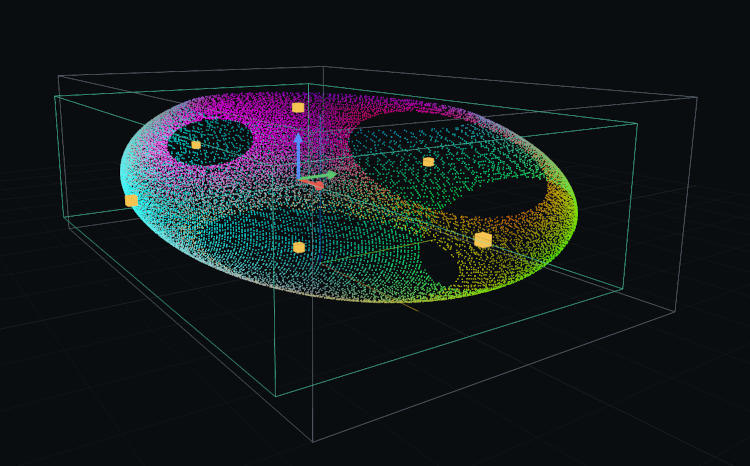
Cropping a point cloud means isolating a spatial subset before inspection or export. WolkeViz provides an axis-aligned clip box and an adjustable clip plane, with visible handles and numeric controls, so you can focus on a building, vehicle, corridor, or section of a scene.
At a glance
A clip box or plane limits what is shown or selected for the current task. Keep the original source file intact unless you intentionally export a derived subset.
A box is useful for a bounded 3D object or area. A plane is useful for removing one side of a scene or examining a cross-section.
Active clip-box and clip-plane rules can be applied during supported PCD exports. WolkeViz can also export a binary PLY crop from currently loaded points; the source file remains unchanged.
Practical workflow
Technical notes
At its simplest, an axis-aligned crop box tests whether each point falls inside minimum and maximum X, Y, and Z limits. A clip plane tests which side of a plane each point occupies. Classification, intensity, box, and plane filters can be combined without rewriting the source cloud.
The coordinate system matters. A fixed crop in a moving sensor frame will move relative to the physical environment because WolkeViz does not apply TF, odometry, SLAM, or motion compensation.
A cropped file is derived data. For COPC, export includes currently loaded visible points inside the active clipping rules and is not a complete extraction of every source node intersecting the volume. Record the source, coordinate frame, crop parameters, and filtering applied.
Questions and answers
Clipping commonly changes the current view or selection, while cropping often refers to creating a subset for export. In both cases, the goal is to isolate points by spatial location.
Yes. A 3D crop box is useful for selecting points inside a bounded volume, such as a vehicle, façade, tree, or a section of road corridor.
Usually no. Keep the original as the source of record and treat the crop as a documented derivative, especially when it will be used for analysis or shared with others.
Keep exploring