
TL;DR
Open the PCD to LAZ converter , choose a supported local .pcd file, review the preview and preservation information, then download the resulting .laz file.
The conversion runs locally in your browser. There is no upload, account, login, or desktop installation required.
Open PCD to LAZ converter Read the PCD viewer guide
1. Open the PCD to LAZ converter
Open the PCD to LAZ converter in a modern browser. The focused route opens the converter with PCD as the expected input and LAZ as the output.
This is useful when a PCL, robotics, simulation, or sensor workflow has produced a PCD file but the next GIS, survey, storage, or sharing workflow prefers compressed LAZ.
2. Choose or drag in the PCD file
Click the file control or drag a .pcd file into the page. WolkeViz reads the selected file on your computer. It does not send the point cloud, coordinates, filename, or generated result to a Klar3D conversion server.
The converter needs scalar x, y, and z fields. A PCD with packed rgb or rgba colour can be converted to a LAZ point format that stores RGB. Other available attributes are inspected before conversion.
3. Review the compact preview and file details
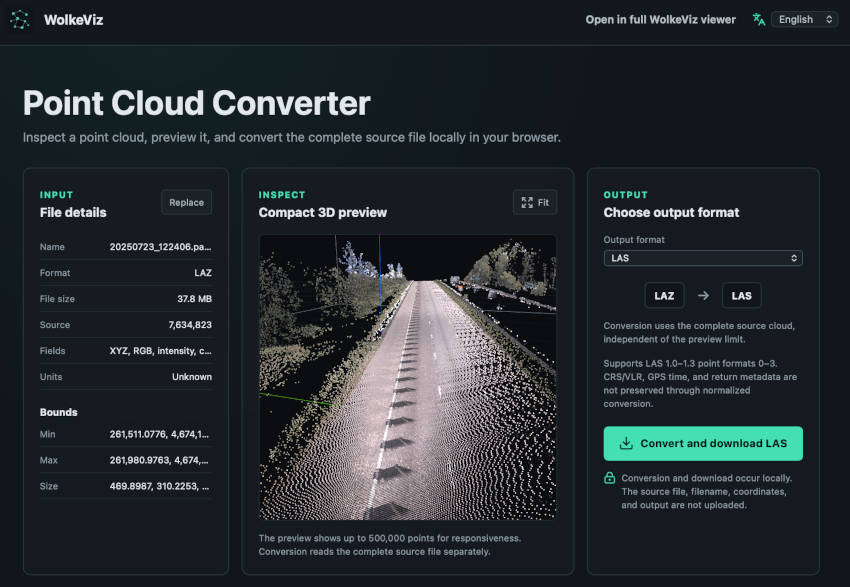
After the file opens, inspect the point count, bounds, fields, and 3D preview. Fit and rotate the cloud to catch common problems before creating an output: the wrong coordinate frame, unexpected scale, empty geometry, or a file that contains fewer useful fields than expected.
The preview is deliberately bounded so the browser remains responsive. The LAZ conversion rereads the complete original PCD, so the downloaded file is not limited to the points shown in the preview.
4. Check which attributes can be carried into LAZ
Review any preservation warning before converting. The PCD-to-LAZ workflow writes XYZ and can preserve represented RGB, intensity, classification, return number, and number of returns. A PCD may contain additional flexible or application-specific fields—such as normals, ring IDs, timestamps, labels, or custom descriptors—that do not have a matching field in this LAZ output.
Do not assume that conversion preserves every item of metadata. It does not infer a coordinate reference system, change units, transform coordinates, register clouds, or create missing fields. Keep the original PCD and its sensor or project metadata alongside the LAZ result.
5. Convert, download, and verify the LAZ file
Click Convert and download LAZ and wait for the browser to finish encoding and compressing the complete source cloud. The download uses a .laz filename derived from the PCD name.
Open the result in WolkeViz or the intended downstream application. Compare the point count, bounds, geometry, and attributes you need against the original. For a repeated workflow, first verify one representative PCD before processing a larger batch.
What is a PCD file?
PCD, short for Point Cloud Data, is the file format commonly associated with the Point Cloud Library (PCL). Its header declares the fields in each point record, including each field’s name, type, size, count, and the way the point payload is encoded. A PCD file can contain XYZ positions alone, or XYZ together with RGB/RGBA, intensity, normals, ring IDs, timestamps, and custom sensor-specific fields.
That flexibility is useful in robotics and perception pipelines, but it also means two valid PCD files may not contain the same attributes. Read the header or inspect the file before assuming that RGB, intensity, or another field exists.
What is a LAZ file?
LAZ is the losslessly compressed form of LAS, a widely used binary exchange format for LiDAR point clouds. A LAZ file stores LAS-compatible point records more compactly, which can reduce storage and transfer costs while retaining the values written into those records.
LAZ has standardized point formats rather than PCD’s open-ended field layout. In this conversion workflow, the writer chooses a LAS-compatible output point format based on whether RGB is available. That is why the converter reports preservation warnings: an arbitrary PCD field cannot always be represented in a standard LAZ record.
When PCD to LAZ conversion makes sense
Convert PCD to LAZ when you need a smaller, broadly recognized LiDAR exchange file and the information required by the next workflow fits the supported LAZ attributes. Keep PCD when a downstream PCL, robotics, or perception tool relies on custom fields that LAZ cannot represent.
For several same-format files, see the batch point-cloud conversion guide. For the reverse workflow, read how to convert LAZ to PCD. You can also inspect a result with the LAZ viewer guide.